What Does the System Need?
When building a customer support system on the platform, it requires some essential components and preparations before and during the building process. This document will clarify these requirements.
System Components from the Platform's Perspective
Entities
Support Ticket Entity
| Field Name | Required | Type |
|---|---|---|
| Ticket Number | ✅ | Sequential Field |
| Ticket Title | ✅ | Multi-language Text |
| Ticket Description | ✅ | Multi-language Text |
| Ticket Status | ✅ | Classification (Open, In Progress, Closed, Responded, Duplicate) |
| Assignee | ✅ | User Group |
| Ticket Opening Date | ✅ | Date and Time |
| Ticket Closing Date | ✅ | Date and Time |
| Solution | Block | |
| Solution | Multi-language Text | |
| Service Rating | Block | |
| Rating Score | Converter (from 1 to 5) | |
| Comment | Multi-language Text |
Workflow
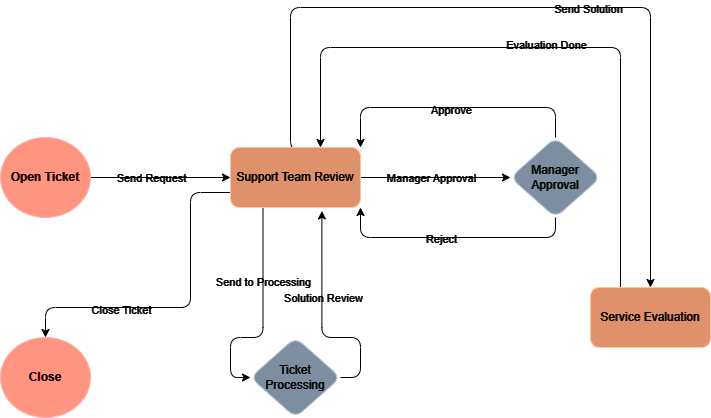
Interactions
Notify the Support Desk of a New Ticket
The support desk is notified when a new ticket arrives in the system.
Notify the Customer of Ticket Receipt
A notification is sent to the customer to confirm that their ticket has been successfully received.
Notify the Support Representative of a New Ticket Assignment
The support representative is notified that a new ticket has been assigned to them for processing.
Notify the Support Desk to Review the Solution
A notification is sent to the support desk when the provided solution to a ticket needs to be reviewed.
Notify the Support Representative of Solution Approval
The support representative is informed of the customer's approval of the proposed solution.
Notify the Ticket Owner to Provide Feedback
The ticket owner is asked to provide feedback on the support service.
Queries
Query Closed Tickets
The system allows users to view closed tickets and their related details.
Statistics
Graph of Closed Tickets
The system provides a graph showing the number of closed tickets over time.
Views
Ticket Request View
Users can request a new support ticket through this view.
Incoming Requests View
The support desk and support representatives can receive and process incoming requests in the system.
Reports
Monthly Performance Report
A monthly report summarizes the performance of the ticket management and support system over the previous month, including the number of open and closed tickets.
Preparations Needed Before Building the System
Add Users and Define Their Permissions
Users are added to the system by system administrators and their permissions are assigned.
Details on adding users can be found here.
Customers and employees need to be added to the system.
Add User Group
After adding users, the support desk group needs to be defined.
You can add your group by following the instructions provided here.